{{Callout|Info|h=<big>Uh oh, this page is still under research!</big>|Due to the nature of science, this page can be out of date or lacking information. This page will be updated as soon as we can. We thank you for your patience crewmate!|align=Center|image=Kaleigh.png}}
{{Imported Page}}
[[Category:Departments]]
{{Callout|Info|h=<big>Uh oh, this page is still under research!</big>|Due to the nature of Science, this page can be out of date or lacking information. This page will be updated as soon as we can. We thank you for your patience crewmate!|align=Center|image=Kaleigh.png}}
'''Welcome to the Science department!'''
'''Welcome to the Science department!'''
One second you might be excitedly stumbling onto a money printing artifact. The next moment that same artifact turns science department into a crater. This department is all about throwing caution to the wind all while you scream "'''In the name of science!!'''"
One second you might be excitedly stumbling onto a money printing artifact. The next moment that same artifact turns the Science department into a crater. This department is all about throwing caution to the wind all while you scream "'''In the name of science!'''"
'''Science''', also called '''Research and Development''', '''R&D''', or '''RnD''', is a large department that revolves around the acquisition and use of research points to gain new technologies for the station. The department is composed of three subdepartments—[[Anomalous Research]], [[Xenoarcheology]], and [[Robotics]]—and it's staffed by the [[Research Director]], [[scientist]]s, and [[research assistant]]s, with [[cyborg]]s being manufactured by the department.
'''Science''', also called '''Research and Development''', '''R&D''', or '''RnD''', is a large department that revolves around the acquisition and use of research points to gain new technologies for the station. The department is composed of three subdepartments—[[Anomalous Research]], [[Xenoarcheology]], and [[Robotics]]—and it's staffed by the [[Research Director]], [[scientist]]s, and [[research assistant]]s, with [[cyborg]]s being manufactured by the department.
Line 11:
Line 14:
=== Anomalous Research ===
=== Anomalous Research ===
[[File:Anomgenbase.png|left|100px]]
[[File:Anomgenbase.png|alt=A picture of the anomaly generator|right|100px]]
[[Anomalous Research]] is a subdepartment of R&D focused around the containment and manipulation of various unique anomalies.
[[Anomalous Research]] is focused around the containment and manipulation of various unique anomalies. It's one of R&D's main ways to harvest research points, and the leading cause of headaches in captains of non-coordinated stations. These anomalies can be extremely dangerous to the station if left alone, so be careful!
One of R&D's main ways to harvest research points, and the leading cause of headaches in captains of non-coordinated stations. These anomalies can be extremely dangerous to the station if left alone so be careful!
=== Xenoarcheology ===
=== Xenoarcheology ===
[[File:Alien artifact-East-4911.png|left|100px]]
[[File:Alien artifact-East-4911.png|alt=A picture of a artifact|right|100px]]
[[Xenoarcheology]] is the other main methodology for producing research points.
[[Xenoarcheology]] is the other main methodology for producing research points. This methodology for harvesting is simultaneously safer for the station and more dangerous for Science personnel. Xenoarcheology involves a lot of trial and error to figure out to activate alien artifacts, which can be really mild or really dangerous.
This methodology for harvesting is simultaneously safer for the station and more dangerous for science personnel. This section of science involves a lot of trial and error to figure out to activate alien artifacts. These artifacts can be really mild or really dangerous depending on their depth.
[[File:Cyborg (Si-8864)-South-4944.png|alt=A picture of a Cyborg with the generic chassis|right|100px]]
[[Robotics]] is the synthetic lifeblood of the station.
[[Robotics]] is the synthetic lifeblood of the station. Robotics strives to create as many synthetic lives as they can to help the station and its crew. Roboticists can make small and helpful bots, such as medibots. They may also focus on more expensive creations like [[Cyborg]]s and [[mech]]s, such as the [[Ripley APLU]].
Robotics is a department that strives to create as many synthetic lives as they can to help the station and it's crew. Roboticists can make small and helpful bots, such as medibots. They may also focus on more expensive creations like cyborgs and mechs like the Ripley.
== Staff ==
== Staff ==
=== Research Director ===
=== Research Director ===
[[File:RD.png|left|100px]]
[[File:RD.png|alt=A picture of the many looks of the Research Director|right|100px]]
The [[Research Director]] (often shortened to RD) is in charge of the Science department and oversees the duties of Research and Development.
The [[Research Director]] (often shortened to RD) is in charge of the Science department and oversees the duties of Research and Development.
Line 37:
Line 34:
=== Scientist ===
=== Scientist ===
[[File:Vince Shaw-South.png|left|100px]]
[[File:Vince Shaw-South.png|alt=A picture of what a Scientist cold look like|right|100px]]
[[Scientist]]s follow guidance, direction, and tasks assigned by the Research Director.
[[Scientist]]s follow guidance, direction, and tasks assigned by the Research Director.
Scientists are usually tasked with providing research points by researching artifacts or studying anomalies. Scientists may also be tasked with building and providing various high tech tools, weapons, equipment, and machines to the other various departments. It's important as a scientist to be kind to your colleagues, provide gifts for others, and throw caution to the wind '''in the name of science!!'''
Scientists are usually tasked with providing research points by researching artifacts or studying anomalies. Scientists may also be tasked with building and providing various high tech tools, weapons, equipment, and machines to the other various departments. It's important as a scientist to be kind to your colleagues, provide gifts for others, and throw caution to the wind '''in the name of science!'''
=== Research Assistant ===
=== Research Assistant ===
[[File:Eric Poley-South.png|left|100px]]
[[File:Eric Poley-South.png|alt=What a Research Assistant could look like|right|100px]]
[[Research assistant]]s follow guidance, direction, and tasks assigned by the Research Director and Scientists.
[[Research assistant]]s follow guidance, direction, and tasks assigned by the Research Director and Scientists.
Research assistants are usually tasked with providing research points by researching artifacts or studying anomalies. Feel free to ask someone higher up if you get confused on what to do or how to do something. Study, learn, and watch your teacher blow up the science department while trying to teach you artifacts!
Research assistants are usually tasked with providing research points by researching artifacts or studying anomalies. Feel free to ask someone higher up if you get confused on what to do or how to do something. Study, learn, and watch your teacher blow up the Science department while trying to teach you artifacts!
[[File:Cyborg (Si-8864)-South-4944.png|alt=A picture of a Cyborg with the generic chassis|right|100px]]
Brought to life by the power of research and technology sits the silicon life of the [[Cyborg]].
Brought to life by the power of research and technology sits the silicon life of the [[Cyborg]].
The cyborg is bound by [[Server Rules#Silicones must follow Silicon Rules|silicon laws]] that restrict how they can interact with others. With a default "crewsimov" set of laws the cyborg will be out to help the crew in any way they are asked to. Cyborgs typically will report to science to assist research and in turn gain the benefit of new chasis and modules that will aid their goals.
The Cyborg is bound by [[Server Rules#Silicones must follow Silicon Rules|silicon laws]] that restrict how they can interact with others. With a default "crewsimov" set of laws the cyborg will be out to help the crew in any way they are asked to. Cyborgs typically will report to Science to assist research and in turn gain the benefit of new chassis and modules that will aid their goals.
== Researching technologies ==
== Researching technologies ==
Research points are used to unlock new technologies and can be acquired through a few different sources, the most profitable being Xenoarcheology, which is the process of analyzing and activating different randomly generated artifacts that can be found via events, [[salvage]] debris, and by ordering them from cargo. Most artifacts have more than one Stimulus-Reaction combination (known scientifically as Nodes), so make sure to scan and activate as many of them as you can before selling it to cargo, or keeping it around because its effects are cool enough to warrant keeping.
Research points are used to unlock new technologies and can be acquired through a few different sources, the most profitable being [[Xenoarcheology]], which is the process of analyzing and activating different randomly generated artifacts that can be found via events, [[Salvage Specialist|salvage]] debris, and by ordering them from cargo. Most artifacts have more than one Stimulus-Reaction combination (known scientifically as Nodes), so make sure to scan and activate as many of them as you can before selling it to cargo, or keeping it around because its effects are cool enough to warrant keeping.
Another highly valuable source of research points is Anomalous Research. Most R&D departments come equipped with an Anomaly Generator, Anomalous Particle Emitters (A.P.E.), and Anomaly Vessels, which are used to spawn, interact with, and generate points from anomalies respectively. Anomalies can come in different forms, ranging from raging balls of pink-hot matter to electrically-discharging motes of light to radioactive gravity wells, so make sure to wear some protective gear while studying them.
Another highly valuable source of research points is [[Anomalous Research]]. Most R&D departments come equipped with an Anomaly Generator, Anomalous Particle Emitters (A.P.E.), and Anomaly Vessels, which are used to spawn, interact with, and generate points from anomalies respectively. Anomalies can come in different forms, ranging from raging balls of pink-hot matter to electrically-discharging motes of light to radioactive gravity wells, so make sure to wear some protective gear while studying them.
Points can also be acquired through research disks, which can be found in maintenance, expeditions, or salvaged from space.
Research points can also be acquired through research disks, which can be found in maintenance, expeditions, or salvaged from space.
[[File:R&D Console UI.png|alt=The user interface of the R&D Console|thumb|The user interface of the R&D Console]]
[[File:R&D Console UI.png|alt=The user interface of the R&D Console|thumb|The user interface of the R&D Console]]
New technologies can be researched in the R&D Console by using previously generated points. When opening the console, it will display the department's current amount of research points, Main Discipline, and tiers for each discipline. On the right side of the console's window is a list of four different technologies, one for each discipline. This list is randomized each time the department researches a new technology, taking from the ''Researchable Technologies'' list on the left side. Technologies that have already been researched are listed in the ''Unlocked Technologies'' section.
New technologies can be researched in the R&D Console by using previously generated points. When opening the console, it will display the department's current amount of research points, Main Discipline, and tiers for each discipline. On the right side of the console's window is a list of four different technologies, one for each discipline. This list is randomized each time the department researches a new technology, taking from the ''Researchable Technologies'' list on the left side. Technologies that have already been researched are listed in the ''Unlocked Technologies'' section.
The four disciplines into which technologies are categorized are ''Industrial'', ''Arsenal'', ''Experimental'', and ''Civilian Services'', with the first three being aimed towards the [[Engineering]], [[Security]], Science departments respectively, while Civilian Services mainly covers [[Service]], with a handful of technologies aimed at [[Medical]] and [[Cargo]].
All the progress made by the Science department, including points and technologies, is stored in the R&D server. If the department loses its server, all unlocked technologies will be lost and all connected fabricators will lose the ability to craft items associated with these technologies.
Technologies are ranked into three tiers, with tier 1 being lower than tier 2 and this, in turn, being lower than tier 3. Generally, higher tier technologies unlock stronger and better equipment than lower tiers. To research higher tier technologies, the department must increase the tier of the respective discipline, done by researching the majority of technologies available in the prior tier. For example, researching the majority of tier 1 Industrial technologies will allow scientists to the research tier 2 Industrial technologies, but not tier 2 Arsenal, Experimental, or Civilian Services technologies.
The four disciplines into which technologies are categorized are ''Industrial'', ''Arsenal'', ''Experimental'', and ''Civilian Services'', with the first three being aimed towards the [[Engineering]], [[Security]], and [[Science]] departments respectively, while Civilian Services mainly covers [[Service]], with a handful of technologies aimed at [[Medical]] and [[Cargo]]. A few upgrades benefiting [[Cargo]] are also under the ''Industrial'' discipline.
Assuming they have enough points, the Science department can research all tier 1 and tier 2 technologies but, generally, they must choose a single discipline to increase to tier 3, as researching tier 3 technologies for one discipline will lock out tier 3 technologies for the other three disciplines. This tier 3 discipline becomes their ''Main Discipline''. It is possible to reach tier 3 in multiple disciplines through gambling with the Technology Disk Terminal or if the Science department acquires multiple servers, as the Main Discipline is only a per-server limit.
Technologies are ranked into three progressive tiers—1, 2, and 3. Generally, higher tier technologies unlock stronger and better equipment than lower tiers. To research higher tier technologies, researchers must increase the tier of the respective discipline, done by researching the majority of technologies available in the prior tier. For example, researching the majority of tier 1 Industrial technologies will allow scientists to the research tier 2 Industrial technologies, but not tier 2 Arsenal, Experimental, or Civilian Services technologies.
All the progress made by the Science department, including points and technologies, is storted in the server; if the department loses its server, all unlocked technologies will be lost and all connected fabricators will lose the ability to craft items associated with these technologies.
Assuming they have enough points, the Science department can research all tier 1 and tier 2 technologies, but increasing a discipline to tier 3 makes it become the department's ''Main Discipline'' - generally you can only have one tier 3 discipline. It is possible to get tier 3 technologies from other disciplines, either through gambling with the Technology Disk Terminal or by acquiring multiple R&D servers, as the Main Discipline is only a per-server limit.
The [[Protolathe]], [[Circuit Imprinter]], [[Security Techfab]], [[Medical Techfab]], and the [[Exosuit Fabricator]] gain new recipes when researching technologies. These machines can only access unlocked recipes if they're connected to the RD server, so make sure they're set up properly.
The [[Protolathe]], [[Circuit Imprinter]], [[Security Techfab]], [[Medical Techfab]], and the [[Exosuit Fabricator]] gain new recipes when researching technologies. These machines can only access unlocked recipes if they're connected to the R&D server, so make sure they're set up properly.
''The following section will only cover recipes unlocked through research.''
''The following section will only cover recipes unlocked through research.''
=== Protolathe ===
=== Protolathe ===
[[File:Protolathe.png|right|100px]]
[[File:Protolathe.png|alt=A picture of a Protolathe|right|100px]]
The [[Protolathe]] is a machine capable of printing most researched recipes. Protolathes are mainly found at science but can sometimes be found in [[Engineering]] or on [[salvage]] expeditions.
The [[Protolathe]] is a machine capable of printing most researched recipes. Protolathes are mainly found at Science but can sometimes be found in [[Engineering]] or on [[salvage]] expeditions.
|{{item recipe|Bluespace syringe|1|Protolathe|mat only=1|mat only layout=hor}}
|{{item recipe|wide-spectrum anomaly locator|1|Protolathe|mat only=1|mat only layout=hor|blocky=0}}
|Basic Anomalous Research
|1
|{{FORMATNUM:5000}}
|Experimental
|}
|}
=== Circuit Imprinter ===
=== Circuit Imprinter ===
[[File:CircuitImprinter.png|right|100px]]
[[File:CircuitImprinter.png|alt=A picture of a Circuit Imprinter|right|100px]]
The [[Circuit Imprinter]] is a machine capable of printing machine boards used for creating machines and computers. They require {{item|steel}}, {{item|glass}}, {{item|plastic}}, and {{item|gold bar|label=gold}}.
The [[Circuit Imprinter]] is a machine capable of printing machine boards used for creating machines and computers. They all require {{item|steel}} and {{item|glass}}, and some, in addition, need {{item|gold bar|label=gold}} or {{item|plastic}}.
Machine boards can be inserted into a machine frame whilst electronics can be inserted into computers or other machines built with [[Construction]].
Machine boards can be inserted into a machine frame whilst electronics can be inserted into computers or other machines built with [[Construction]].
|{{item recipe|Stasis bed machine board|1|CircuitImprinter|mat only=1|mat only layout=hor}}
|{{item recipe|turbo recharger machine board|1|circuit imprinter|mat only=1|mat only layout=hor|blocky=0}}
| rowspan="2" |Biochemical Stasis
|Advanced Powercells
| rowspan="2" |2
|1
| rowspan="2" |7,500
|{{FORMATNUM:7500}}
|Industrial
|-
|-
|{{item|Cryo pod machine board|cap=1}}
|{{item|wireless camera board|format amount=0|cap=1}}
|{{item recipe|Cryo pod machine board|1|CircuitImprinter|mat only=1|mat only layout=hor}}
|{{item recipe|wireless camera board|1|circuit imprinter|mat only=1|mat only layout=hor|blocky=0}}
|A/V Communication
|1
|{{FORMATNUM:5000}}
|Civilian Services
|}
|}
Line 1,308:
Line 1,616:
The [[Exosuit Fabricator]] is a machine that is capable of crafting a large variety of [[Cyborg]] and [[Mech]] parts. The Exosuit Fabricator is a material hungry machine and can use {{item|gold bar|label=gold}}, {{item|silver bar|label=silver}}, {{item|steel}}, {{item|plastic}}, {{item|glass}}, and {{item|plasma}}. The Exosuit Fabricator is a vital part of [[Robotics|Cyborg creation]] and many of the advanced pieces are locked behind research.
The [[Exosuit Fabricator]] is a machine that is capable of crafting a large variety of [[Cyborg]] and [[Mech]] parts. The Exosuit Fabricator is a material hungry machine and can use {{item|gold bar|label=gold}}, {{item|silver bar|label=silver}}, {{item|steel}}, {{item|plastic}}, {{item|glass}}, and {{item|plasma}}. The Exosuit Fabricator is a vital part of [[Robotics|Cyborg creation]] and many of the advanced pieces are locked behind research.
[[File:security techfab-East-11993.png|alt=A picture of a Security Techfab|right|100px]]
Set deep within the security department sits the [[Security Techfab]]. The Security Techfab can use {{item|steel}}, {{item|plastic}}, {{item|glass}}, {{item|silver bar|label=silver}}, {{item|gold bar|label=gold}}, {{item|uranium}}, and {{item|plasma}}. Providing the Security Techfab with materials will allow crew members to produce ammo, grenades, and weapons. Given some research, this machine can fill the armory with some of the most dangerous weapons you can get a hold of.
Set deep within the security department sits the [[Security Techfab]]. The Security Techfab can use {{item|steel}}, {{item|plastic}}, {{item|glass}}, {{item|silver bar|label=silver}}, {{item|gold bar|label=gold}}, {{item|uranium}}, and {{item|plasma}}. Providing the Security Techfab with materials will allow crew members to produce ammo, grenades, and weapons. Given some research, this machine can fill the armory with some of the most dangerous weapons you can get a hold of.
[[File:medical techfab-East-37017.png|alt=A picture of a Medical Techfab|right|100px]]
Anchored into the back of medical sits the [[Medical Techfab]]. It can use {{item|steel}}, {{item|plastic}}, {{item|glass}}, {{item|cloth}}, {{item|plasma}}, and {{item|silver bar|label=silver}}. A small amount of highly valuable items are acquired through the Medical Techfab.
Anchored into the back of medical sits the [[Medical Techfab]]. It can use {{item|steel}}, {{item|plastic}}, {{item|glass}}, {{item|cloth}}, {{item|plasma}}, and {{item|silver bar|label=silver}}. A small amount of highly valuable items are acquired through the Medical Techfab.
Hyper convection machine are a highly valuable upgrade that is obtained from the Industrial Engineering research node. Hyper convection machines will craft items at a 50% discount from the original cost. The trade-off when it comes to these powerful machines is that they produce an immense amount of heat. The heat that is produced from these machines can quickly become lethal if sufficient preparations are not made. One of the ways to make a safe enclosure for hyper convection machines is:
Hyper convection machines are a highly valuable upgrade that is obtained from the ''Industrial Engineering'' technology. These will only use half the original materials needed when crafting. However, they produce an immense amount of heat, which can quickly become lethal without sufficient preparations. One of the ways to make a safe enclosure for hyper convection machines is:
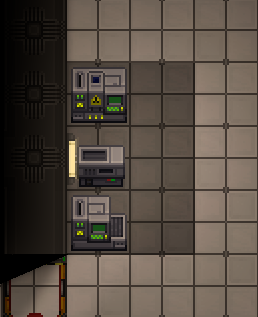
#Un-wrench the machines and move the {{item|Protolathe}}, {{item|Autolathe}}, and {{item|Circuit Imprinter}} to the back wall. If there is a {{item|R&D Computer}}, move it out of the way.[[File:HyperA.png|alt=Hyperconvection building part 1|center]]
#Unwrench the {{item|protolathe}}, {{item|autolathe}}, and {{item|circuit Imprinter}} and put them against a wall.[[File:HyperA.png|alt=Hyperconvection building part 1|center]]
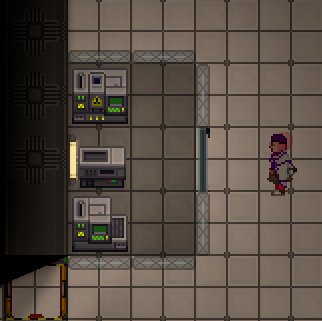
#Build a 2x3 box of {{item|directional reinforced window|label=directional reinforced windows}}. At the middle-right side of the box create a {{item|windoor}}.[[File:HyperB.png|alt=Hyperconvection building part 2|center]]
#Build a 2x3 box of {{item|directional reinforced window|label=directional reinforced windows}}, with a {{item|windoor}} for access.[[File:HyperB.png|alt=Hyperconvection building part 2|center]]
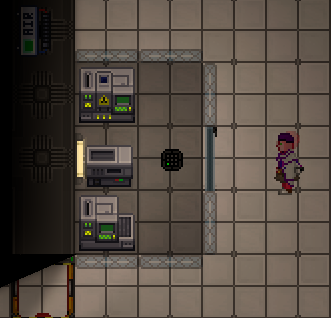
#Create an {{item|air alarm}} and a {{item|air sensor}}. Place the air sensor within the box at the center right, and the air alarm nearby for convenience.[[File:HyperC.png|alt=Hyperconvection building part 3|center]]
#Create an {{item|air alarm}} and an {{item|air sensor}}. Place the air sensor within the box and the air alarm nearby.[[File:HyperC.png|alt=Hyperconvection building part 3|center]]
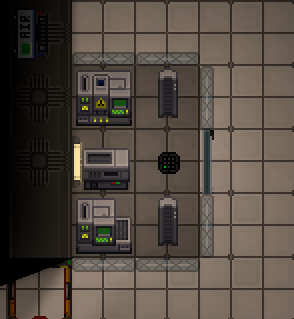
#Create one (required) or two (optional) {{item|space heater|label=space heater(s)}} at the top-right and bottom-right of the box.[[File:HyperD.png|alt=Hyperconvection part 4|center]]4a. Set the space heaters to have {{button|High|state=pressed}} energy consumption and make sure that they are {{button|On|state=pressed}}.[[File:HyperD1.png|alt=Hyperconvection part 4.1|center]]
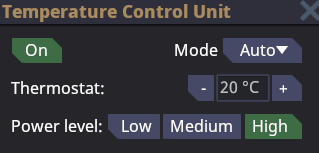
#Put at least one {{item|space heater}} in the glass box.[[File:HyperD.png|alt=Hyperconvection part 4|center]]4a. Turn on the space heaters and set their power level to {{button|High|state=pressed}}.[[File:HyperD1.png|alt=Hyperconvection part 4.1|center]]
#Either [[Hacking|hack]] the air alarm or ask an engineer to help you with [[networking]]. To [[Hacking|hack]] the air alarm we must first use a {{item|screwdriver}} on it to open the panel. When the panel is open use a {{item|wirecutter}} tool on the air alarm itself. The lights above refer to the wires below. The wire that we are looking to cut is the ACC wire. The ACC wire is what controls who is authorized to network and control the Air Alarm.[[File:HyperE1.png|alt=Air alarm panel|center]]5a. Cut the wires from left to right (by clicking on them with a wirecutter in hand) until you get the ACC light to turn off. You may get unlucky like I did and hit a power wire before the ACC wire, you will get shocked because of this. Skip the power wire and continue until you reach the ACC wire. Once you have found the ACC wire repair all other wires (by clicking on them with a wirecutter in hand) and leave the ACC wire cut. Close the panel on the air alarm with the screwdriver.[[File:HyperE2.png|alt=Hyperconvection part 4.2|center]]
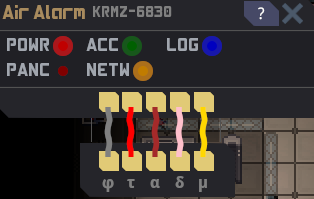
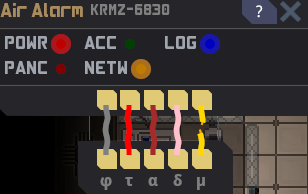
#[[Hacking|Hack]] the air alarm or ask an [[engineer]] to help you with networking. To hack the air alarm, first use a {{item|screwdriver}} on it to open the panel. When the panel is open, use a {{item|wirecutter}} tool on the air alarm itself. The lights above refer to the wires below. The wire that we are looking to cut is the ACC wire (short for ACCESS), which controls who is authorized to network and control the air alarm.[[File:HyperE1.png|alt=Air alarm panel|center]]5a. Cut the wires from left to right by clicking on them with a wirecutter in hand until you get the ACC light to turn off. You may get unlucky like I did and hit a power wire before the ACC wire, you will get shocked because of this. Skip the power wire and continue until you reach the ACC wire. Once you have found the ACC wire, repair all other wires by clicking on them with a wirecutter in hand and leave the ACC wire cut. Close the panel on the air alarm with the screwdriver.[[File:HyperE2.png|alt=Hyperconvection part 4.2|center]]
#Use a {{item|multitool}} or a {{item|network configurator}} and click on the air sensor first, followed by the air alarm.[[File:HyperF2.png|alt=air sensor clicked|center]]6a. Click {{button|Add}} on the air alarm GUI and then close the GUI.[[File:HyperF1.png|alt=Air alarm networking|center]]
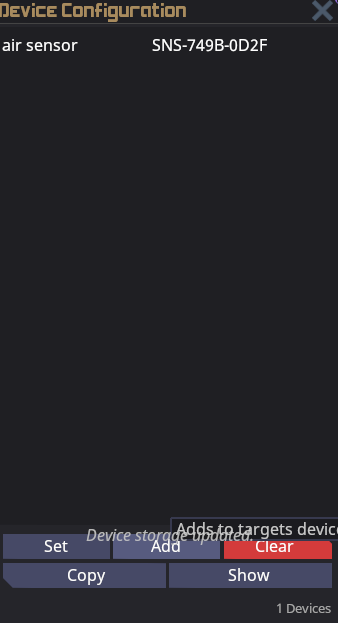
#Use a {{item|multitool}} or a {{item|network configurator}} and click on the air sensor first, followed by the air alarm.[[File:HyperF2.png|alt=air sensor clicked|center]]6a. Click {{button|Add}} on the air alarm GUI and then close the GUI.[[File:HyperF1.png|alt=Air alarm networking|center]]
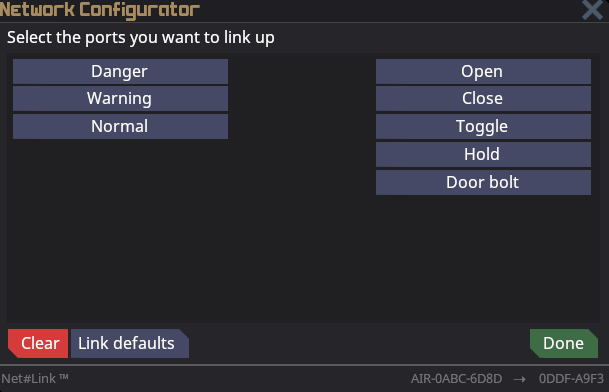
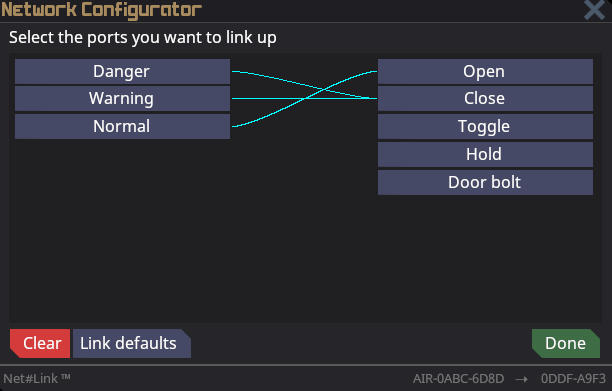
#In a similar process, use a multitool or a network configurator and click on the windoor first, followed by the air alarm. [[File:HyperG1.png|alt=Hyperconvection networking windoor|center]]7a. Click the {{button|Danger}} button and then click {{button|Close}}. Click on the {{button|Warning}} button and click {{button|Close}}. Finally, click the {{button|Normal}} button and then click {{button|Open}}. Then click the {{button|Done}} button.[[File:HyperG2.png|alt=Hyperconvection networking windoor|center]]
#In a similar process, use a multitool or a network configurator and click on the windoor first, followed by the air alarm. [[File:HyperG1.png|alt=Hyperconvection networking windoor|center]]7a. Click the {{button|Danger}} button and then click {{button|Close}}. Click on the {{button|Warning}} button and click {{button|Close}}. Finally, click the {{button|Normal}} button and then click {{button|Open}}. Then click the {{button|Done}} button.[[File:HyperG2.png|alt=Hyperconvection networking windoor|center]]
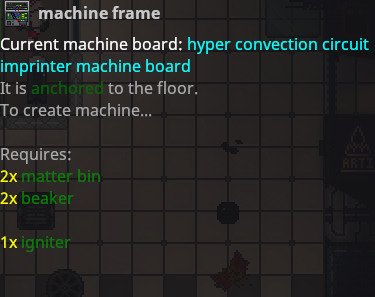
#Create the {{item|CircuitImprinterHyperConvectionMachineCircuitboard}} at the Circuit Imprinter. Create or gather 1 matter bin and 1 igniter. Use a screwdriver to open the panel on the Circuit Imprinter.[[File:Imprinter_panel_open.png|alt=Imprinter panel open|center]]8a. Use a crowbar to deconstruct the imprinter into a machine frame.[[File:Imprinter_machineframe.png|alt=Imprinter machineframe|center]]8b. Use a crowbar again to remove the parts from the machine frame.[[File:Imprinter_machineframe1.png|alt=Imprinter machineframe1|center]]8c. Remove the Circuit Imprinter machine board from the stack of items. Click on the machine frame while holding the hyper convection Circuit Imprinter machine board. Shift click the machine frame and fill it with the rest of the materials that it requires. (You should have all the materials if the previous steps were followed).[[File:Machine_frame_p3.png|center]]8d. Screwdriver the machine frame to finish the construction. (If this does not work you are missing materials).
#Create the {{item|CircuitImprinterHyperConvectionMachineCircuitboard}} at the circuit imprinter. Create or gather 1 matter bin and 1 igniter. Use a screwdriver to open the panel on the Circuit Imprinter.[[File:Imprinter_panel_open.png|alt=Imprinter panel open|center]]8a. Use a crowbar to deconstruct the imprinter into a machine frame.[[File:Imprinter_machineframe.png|alt=Imprinter machineframe|center]]8b. Use a crowbar again to remove the parts from the machine frame.[[File:Imprinter_machineframe1.png|alt=Imprinter machineframe1|center]]8c. Remove the circuit imprinter machine board from the stack of items. Click on the machine frame while holding the hyper convection circuit imprinter machine board. Shift+click the machine frame and fill it with the rest of the materials that it requires. You should have all the materials if the previous steps were followed.[[File:Machine_frame_p3.png|center]]8d. Screwdriver the machine frame to finish the construction. If this does not work, you are missing materials.
# Repeat step 8 through 8d with the Protolathe and Autolathe machines.
# Repeat step 8 through 8d with the Protolathe and Autolathe machines.
# Congratulations! You have built a hyper convection machines and a safe setup! Good work fellow scientist!
# Congratulations, you have set-up hyper convection machines for safe use! Good work, fellow scientist!
Latest revision as of 17:25, 30 October 2026
Imported Page
This page has been imported from Wizden's SS14 wiki with no or minimal edits.
The page might not include changes made for the Paradise 14 Server. It might also contain missing links, missing images or otherwise not live up to Paradise Wiki standards.
The page may be updated or deleted without notice.
One second you might be excitedly stumbling onto a money printing artifact. The next moment that same artifact turns the Science department into a crater. This department is all about throwing caution to the wind all while you scream "In the name of science!"
Science, also called Research and Development, R&D, or RnD, is a large department that revolves around the acquisition and use of research points to gain new technologies for the station. The department is composed of three subdepartments—Anomalous Research, Xenoarcheology, and Robotics—and it's staffed by the Research Director, scientists, and research assistants, with cyborgs being manufactured by the department.
Anomalous Research is focused around the containment and manipulation of various unique anomalies. It's one of R&D's main ways to harvest research points, and the leading cause of headaches in captains of non-coordinated stations. These anomalies can be extremely dangerous to the station if left alone, so be careful!
Xenoarcheology
Xenoarcheology is the other main methodology for producing research points. This methodology for harvesting is simultaneously safer for the station and more dangerous for Science personnel. Xenoarcheology involves a lot of trial and error to figure out to activate alien artifacts, which can be really mild or really dangerous.
Robotics
Robotics is the synthetic lifeblood of the station. Robotics strives to create as many synthetic lives as they can to help the station and its crew. Roboticists can make small and helpful bots, such as medibots. They may also focus on more expensive creations like Cyborgs and mechs, such as the Ripley APLU.
Staff
Research Director
The Research Director (often shortened to RD) is in charge of the Science department and oversees the duties of Research and Development.
While they will ideally have Scientists under them to aid in research, they are expected to have at least a fundamental understanding of how to operate their department. The Research Director will be focusing on teaching any staff that needs assistance. The Research Director is also expected to lead the team through a path of research through the Research Tree. The Research Director might also have to pick up any role that is missing so that the department remains functional.
Scientist
Scientists follow guidance, direction, and tasks assigned by the Research Director.
Scientists are usually tasked with providing research points by researching artifacts or studying anomalies. Scientists may also be tasked with building and providing various high tech tools, weapons, equipment, and machines to the other various departments. It's important as a scientist to be kind to your colleagues, provide gifts for others, and throw caution to the wind in the name of science!
Research Assistant
Research assistants follow guidance, direction, and tasks assigned by the Research Director and Scientists.
Research assistants are usually tasked with providing research points by researching artifacts or studying anomalies. Feel free to ask someone higher up if you get confused on what to do or how to do something. Study, learn, and watch your teacher blow up the Science department while trying to teach you artifacts!
Cyborg
Brought to life by the power of research and technology sits the silicon life of the Cyborg.
The Cyborg is bound by silicon laws that restrict how they can interact with others. With a default "crewsimov" set of laws the cyborg will be out to help the crew in any way they are asked to. Cyborgs typically will report to Science to assist research and in turn gain the benefit of new chassis and modules that will aid their goals.
Researching technologies
Research points are used to unlock new technologies and can be acquired through a few different sources, the most profitable being Xenoarcheology, which is the process of analyzing and activating different randomly generated artifacts that can be found via events, salvage debris, and by ordering them from cargo. Most artifacts have more than one Stimulus-Reaction combination (known scientifically as Nodes), so make sure to scan and activate as many of them as you can before selling it to cargo, or keeping it around because its effects are cool enough to warrant keeping.
Another highly valuable source of research points is Anomalous Research. Most R&D departments come equipped with an Anomaly Generator, Anomalous Particle Emitters (A.P.E.), and Anomaly Vessels, which are used to spawn, interact with, and generate points from anomalies respectively. Anomalies can come in different forms, ranging from raging balls of pink-hot matter to electrically-discharging motes of light to radioactive gravity wells, so make sure to wear some protective gear while studying them.
Research points can also be acquired through research disks, which can be found in maintenance, expeditions, or salvaged from space.
The user interface of the R&D Console
New technologies can be researched in the R&D Console by using previously generated points. When opening the console, it will display the department's current amount of research points, Main Discipline, and tiers for each discipline. On the right side of the console's window is a list of four different technologies, one for each discipline. This list is randomized each time the department researches a new technology, taking from the Researchable Technologies list on the left side. Technologies that have already been researched are listed in the Unlocked Technologies section.
All the progress made by the Science department, including points and technologies, is stored in the R&D server. If the department loses its server, all unlocked technologies will be lost and all connected fabricators will lose the ability to craft items associated with these technologies.
The four disciplines into which technologies are categorized are Industrial, Arsenal, Experimental, and Civilian Services, with the first three being aimed towards the Engineering, Security, and Science departments respectively, while Civilian Services mainly covers Service, with a handful of technologies aimed at Medical and Cargo. A few upgrades benefiting Cargo are also under the Industrial discipline.
Technologies are ranked into three progressive tiers—1, 2, and 3. Generally, higher tier technologies unlock stronger and better equipment than lower tiers. To research higher tier technologies, researchers must increase the tier of the respective discipline, done by researching the majority of technologies available in the prior tier. For example, researching the majority of tier 1 Industrial technologies will allow scientists to the research tier 2 Industrial technologies, but not tier 2 Arsenal, Experimental, or Civilian Services technologies.
Assuming they have enough points, the Science department can research all tier 1 and tier 2 technologies, but increasing a discipline to tier 3 makes it become the department's Main Discipline - generally you can only have one tier 3 discipline. It is possible to get tier 3 technologies from other disciplines, either through gambling with the Technology Disk Terminal or by acquiring multiple R&D servers, as the Main Discipline is only a per-server limit.
There is another method to research a technology, and that is using the Technology Disk Terminal. If there is no such console immediately available within the station, it can be created after researching the Tier 1 Experimental technology Alternative Research.
By spending 1000 research points, a technology disk is dispensed, containing the recipe of any single random item of any tier for the lathes to fabricate. The item ranges from a redundant item that has already been researched to highly sought-after and expensive items.
When used early into the round, it may reward the department with end-tier items immediately at the cost of the primary research progress. This is essentially gambling with research points, so ensure that your department agrees with this plan. When used late into the round, it may grant recipes from technologies that have been locked out in favor of the Main Discipline.
The following section will only cover recipes unlocked through research.
Protolathe
The Protolathe is a machine capable of printing most researched recipes. Protolathes are mainly found at Science but can sometimes be found in Engineering or on salvage expeditions.
The Circuit Imprinter is a machine capable of printing machine boards used for creating machines and computers. They all require steel and glass, and some, in addition, need gold bar or plastic.
Machine boards can be inserted into a machine frame whilst electronics can be inserted into computers or other machines built with Construction.
The Exosuit Fabricator is a machine that is capable of crafting a large variety of Cyborg and Mech parts. The Exosuit Fabricator is a material hungry machine and can use gold bar, silver bar, steel, plastic, glass, and plasma. The Exosuit Fabricator is a vital part of Cyborg creation and many of the advanced pieces are locked behind research.
Set deep within the security department sits the Security Techfab. The Security Techfab can use steel, plastic, glass, silver bar, gold bar, uranium, and plasma. Providing the Security Techfab with materials will allow crew members to produce ammo, grenades, and weapons. Given some research, this machine can fill the armory with some of the most dangerous weapons you can get a hold of.
Anchored into the back of medical sits the Medical Techfab. It can use steel, plastic, glass, cloth, plasma, and silver bar. A small amount of highly valuable items are acquired through the Medical Techfab.
Hyper convection machines are a highly valuable upgrade that is obtained from the Industrial Engineering technology. These will only use half the original materials needed when crafting. However, they produce an immense amount of heat, which can quickly become lethal without sufficient preparations. One of the ways to make a safe enclosure for hyper convection machines is:
Unwrench the protolathe, autolathe, and circuit Imprinter and put them against a wall.
Build a 2x3 box of directional reinforced window, with a windoor for access.
Create an air alarm and an air sensor. Place the air sensor within the box and the air alarm nearby.
Put at least one space heater in the glass box.4a. Turn on the space heaters and set their power level to High.
Hack the air alarm or ask an engineer to help you with networking. To hack the air alarm, first use a screwdriver on it to open the panel. When the panel is open, use a wirecutter tool on the air alarm itself. The lights above refer to the wires below. The wire that we are looking to cut is the ACC wire (short for ACCESS), which controls who is authorized to network and control the air alarm.5a. Cut the wires from left to right by clicking on them with a wirecutter in hand until you get the ACC light to turn off. You may get unlucky like I did and hit a power wire before the ACC wire, you will get shocked because of this. Skip the power wire and continue until you reach the ACC wire. Once you have found the ACC wire, repair all other wires by clicking on them with a wirecutter in hand and leave the ACC wire cut. Close the panel on the air alarm with the screwdriver.
Use a multitool or a network configurator and click on the air sensor first, followed by the air alarm.6a. Click Add on the air alarm GUI and then close the GUI.
In a similar process, use a multitool or a network configurator and click on the windoor first, followed by the air alarm. 7a. Click the Danger button and then click Close. Click on the Warning button and click Close. Finally, click the Normal button and then click Open. Then click the Done button.
Create the CircuitImprinterHyperConvectionMachineCircuitboard at the circuit imprinter. Create or gather 1 matter bin and 1 igniter. Use a screwdriver to open the panel on the Circuit Imprinter.8a. Use a crowbar to deconstruct the imprinter into a machine frame.8b. Use a crowbar again to remove the parts from the machine frame.8c. Remove the circuit imprinter machine board from the stack of items. Click on the machine frame while holding the hyper convection circuit imprinter machine board. Shift+click the machine frame and fill it with the rest of the materials that it requires. You should have all the materials if the previous steps were followed.8d. Screwdriver the machine frame to finish the construction. If this does not work, you are missing materials.
Repeat step 8 through 8d with the Protolathe and Autolathe machines.
Congratulations, you have set-up hyper convection machines for safe use! Good work, fellow scientist!


-South-4944.png)


-East-35511.png)

-East-10078.png)


-South-24242.png)


-South-25629.png)