Power: Difference between revisions
imported>Phycowerido |
Added Imported Page template |
||
| (23 intermediate revisions by 11 users not shown) | |||
| Line 1: | Line 1: | ||
{{ | {{Imported Page}} | ||
The [[Station Engineer|Station Engineers]]' primary task is to set up electric power generation methods (excluding the TEG, which must be set up by [[Atmospheric Technician|Atmospheric Technicians]] or the [[Chief Engineer]]), which is essential for keeping a well-functioning space station from descending into darkness. Most computers, machines, and lighting fixtures require power to operate, among others. | |||
{{TOC|depth=4}} | |||
== Supply and Demand == | == Supply and Demand == | ||
[[File:Power Monitoring Console.png|thumb|Use the Power Monitoring Console to determine the station's power demand]] | [[File:Power Monitoring Console.png|thumb|Use the Power Monitoring Console to determine the station's power demand]] | ||
Running an | Running an effective power operation is about meeting with demand from station equipment with the supply of power from generators. Thanks to cutting-edge energy storage technology (SMES, and batteries in substations and APCs) aboard NanoTransen stations, generators do not have to always match instantaneous station demand; it is enough to generate enough power to meet the average station demand. | ||
Use the Power Monitoring Console to determine the station's power demand. In a well-functioning station, SMES balance the instantaneous demand with supply. Don't let them run out! | Use the Power Monitoring Console to determine the station's power demand. In a well-functioning station, SMES balance the instantaneous demand with supply. Don't let them run out! | ||
| Line 14: | Line 13: | ||
If long term demand exceeds supply, you will have angry station inhabitants complaining about lack of power. When supply exceeds demand, the extra power is used to charge energy storage devices. When all energy storage devices are full, the excess power is safely dissipated into space. | If long term demand exceeds supply, you will have angry station inhabitants complaining about lack of power. When supply exceeds demand, the extra power is used to charge energy storage devices. When all energy storage devices are full, the excess power is safely dissipated into space. | ||
It is better to be in a long-term energy surplus than an energy deficit. On the other hand, if your station is powered by non-renewable sources like the Anti-Matter Engine (AME), generating | It is better to be in a long-term energy surplus than an energy deficit. On the other hand, if your station is powered by non-renewable sources like the Anti-Matter Engine (AME), generating more power than you need wastes fuel and contributes to space warming, not to mention, wastes cargo's money <s>which they would have wasted on a lasers crate anyway</s>. | ||
{{Clear|both}} | {{Clear|both}} | ||
== The Power Hierarchy == | == The Power Hierarchy == | ||
[[File:Minimal power example.png|thumb|Example of a station power network. The generator feeds a SMES through a cable terminal, which in turn supplies a substation, which in turn supplies an APC, which powers critical station equipment]] | [[File:Minimal power example.png|thumb|Example of a station power network. The generator feeds a SMES through a cable terminal, which in turn supplies a substation, which in turn supplies an APC, which powers critical station equipment]] | ||
[[File:SS14 PowerHD.png|thumb|right|A screenshot showing an example of a power network. Solar panels produce HV power, which is then buffered with a SMES and redistributed.]] | [[File:SS14 PowerHD.png|thumb|right|A screenshot showing an example of a power network. Solar panels produce HV power, which is then buffered with a SMES and redistributed.]] | ||
Power transmission in SS14 comes in three different flavors | Power transmission in SS14 comes in three different flavors - {{item icon|HV|l=high voltage (HV)}}, {{item icon|MV|l=medium voltage (MV)}}, and {{item icon|LV|l=low voltage (LV)}}. | ||
Power flows from generators and power storage via HV cables to substations around the station. From substations, MV cables going out transmit power from the substation and connected grid to area power controllers (APCs) where LV cables take the power the rest of the way to consumers (3-4 tile radius from the APC to devices in the area). '''A cable must be placed under generators, storage, substations and APCs for them to function'''. | Power flows from generators and power storage via HV cables to substations around the station. From substations, MV cables going out transmit power from the substation and connected grid to area power controllers (APCs) where LV cables take the power the rest of the way to consumers (3-4 tile radius from the APC to devices in the area). '''A cable must be placed under generators, storage, substations and APCs for them to function'''. | ||
=== Separating your Grid === | === Separating your Grid === | ||
One device not mentioned so far is the cable terminal. In order to separate part of your power network you will need to use a cable terminal, with a HV cable on the terminal box side and the wire side facing towards a SMES. Note the cable terminal will act as a separator for HV cable, if two HV cables are right | One device not mentioned so far is the cable terminal. In order to separate part of your power network you will need to use a cable terminal, with a HV cable on the terminal box side and the wire side facing towards a SMES. Note the cable terminal will act as a separator for HV cable, if two HV cables are right next to each other and a connecter is placed upon them it will separate those two cables. When a HV cable is then placed under the SMES this creates two distinct HV cable networks; the side with your generation on which ends at the cable terminal, and the storage / supply side which starts at the SMES and goes out to substations. | ||
Currently if you place a substation on the generation side of your SMES it will drain into said SMES as a supplier. This is important as in this scenario if there isn't enough generation, the substation will drain to empty causing a blackout in its connected APCs while everything on the SMES side will remain powered. | Currently if you place a substation on the generation side of your SMES it will drain into said SMES as a supplier. This is important as in this scenario if there isn't enough generation, the substation will drain to empty causing a blackout in its connected APCs while everything on the SMES side will remain powered. | ||
| Line 35: | Line 33: | ||
{{clear}} | {{clear}} | ||
== Generation == | == Power Generation Methods == | ||
=== Temporary Power Generation === | |||
==== Portable Generators ==== | |||
The simplest and most basic of all generators on this list are the "P.A.C.M.A.N." line of portable generators. The J.R.P.A.C.M.A.N. can be found in [[Engineering]] and maintenance areas, and runs on welding fuel. Anchor it to an {{item icon|LV|l=LV cable}} and power it up. Because it generates LV power, it is only able to power one APC's worth of devices. It also generates exhaust fumes, so make sure you set it up in a well-ventilated area. | |||
The other "P.A.C.M.A.N." generators are intended for usage by engineering for advanced power scenarios. Bootstrapping the engine, powering departments, and so on. unlike the J.R.P.A.C.M.A.N., They connect directly to {{item icon|MV|l=MV}} or {{item icon|HV|l=HV}} power cables, and are able to switch between both types of power output. The standard P.A.C.M.A.N. runs on solid plasma, and the S.U.P.E.R.P.A.C.M.A.N. runs on uranium - these models produce enough power for things like shuttles and departments. | |||
=== | ==== Antimatter Engine ==== | ||
The Antimatter Engine (AME) is not always the main source of power for most stations. However, the AME should be your temporary fix in order to keep the station powered until you can get one or more engines up (TEG, Tesla, Singularity, Solars). | The Antimatter Engine (AME) is not always the main source of power for most stations. However, the AME should be your temporary fix in order to keep the station powered until you can get one or more engines up (TEG, Tesla, Singularity, Solars). [[Station Engineer|Station Engineers]] are responsible for setting up the AME at round start. | ||
==== Setup ==== | ===== Setup ===== | ||
# Grab AME parts from a '''Packaged antimatter reactor''' crate and place one on each floor tile you want a piece of the reactor. The minimum is a 3×3 square, which gives one core. [[File:AME_setup_example1.png|thumb|none|3×3, 1-core AME]] | # Grab AME parts from a '''Packaged antimatter reactor''' crate and place one on each floor tile you want a piece of the reactor. The minimum is a 3×3 square, which gives one core. [[File:AME_setup_example1.png|thumb|none|3×3, 1-core AME]] | ||
# With a multitool in hand, click the AME parts on the floor to build a piece of the reactor. If you mess up, you can deconstruct a built reactor with a lit welder. | # With a multitool in hand, click the AME parts on the floor to build a piece of the reactor. If you mess up, you can deconstruct a built reactor with a lit welder. | ||
| Line 210: | Line 214: | ||
|} | |} | ||
==== Maintenance ==== | ===== Maintenance ===== | ||
The AME will stop generating power when its fuel has been used up. It is wise to periodically check on the AME to make sure it is not out of fuel. If the fuel runs out, you must refuel it: | The AME will stop generating power when its fuel has been used up. It is wise to periodically check on the AME to make sure it is not out of fuel. If the fuel runs out, you must refuel it: | ||
| Line 218: | Line 222: | ||
# Turn the AME back on. | # Turn the AME back on. | ||
It is also wise to periodically check on the AME, since it is a prime target for [[Traitor| | It is also wise to periodically check on the AME, since it is a prime target for [[Traitor|sabotage]]. | ||
You can see if the AME is currently overloaded (and thus taking damage), if the cores glow in a "+"-shape instead of a ball. | You can see if the AME is currently overloaded (and thus taking damage), if the cores glow in a "+"-shape instead of a ball. | ||
| Line 224: | Line 228: | ||
The display of the AME controller indicates if the AME has suffered internal damage. If it is blue, at least 50% of the internal shielding is remaining. If the display shows a red wave, it is below 50%. If the display starts showing swear words, the AME is about to explode. | The display of the AME controller indicates if the AME has suffered internal damage. If it is blue, at least 50% of the internal shielding is remaining. If the display shows a red wave, it is below 50%. If the display starts showing swear words, the AME is about to explode. | ||
=== Solar Power === | === Basic Permanent Power === | ||
==== Solar Power ==== | |||
Solar power is a passive means of generating power. A solar array is made up of a number of solar panels, a single solar tracker device and a solar control computer (console) nearby to properly control and manage the panels. | Solar power is a passive means of generating power. A solar array is made up of a number of solar panels, a single solar tracker device and a solar control computer (console) nearby to properly control and manage the panels. | ||
| Line 233: | Line 239: | ||
Notice the graph on the right has a T shaped white line and a yellow / golden line. The aim is to alter the panel angle (white T line) to match the sun angle (yellow line). Some experimentation might be needed to setup the angular velocity correctly so that the lines stay in sync and generate maximum wattage. Note: a general start for the angular velocity is somewhere around 5-6 degrees per minute. | Notice the graph on the right has a T shaped white line and a yellow / golden line. The aim is to alter the panel angle (white T line) to match the sun angle (yellow line). Some experimentation might be needed to setup the angular velocity correctly so that the lines stay in sync and generate maximum wattage. Note: a general start for the angular velocity is somewhere around 5-6 degrees per minute. | ||
A typical panel near max output will produce | A typical panel near max output will produce 1.5kW. This would be enough to power roughly 1 machine and 1 computer. | ||
Solar panels can be ordered through [[Cargo]] by crates. One crate will contain | Solar panels can be ordered through [[Cargo]] by crates. One crate will contain six solar assembly flatpacks. A flatpack is unpacked using a multitool, which produces an already mounted solar assembly. 2 pieces of glass then need to be added to complete the solar panel. | ||
A solar tracker device is made using a solar assembly flatpack as well, so don't forget to count in an extra one. It's made by unpacking a solar assembly from a flatpack, putting a solar tracker electronics inside the solar assembly and then adding 2 pieces of glass. | A solar tracker device is made using a solar assembly flatpack as well, so don't forget to count in an extra one. It's made by unpacking a solar assembly from a flatpack, putting a solar tracker electronics inside the solar assembly and then adding 2 pieces of glass. | ||
=== | ==== Thermoelectric Generator (TEG) ==== | ||
The | The TEG involves atmospherics, and [[Atmospheric_Technician|atmos]] are usually responsible for setup unlike most other power sources. The TEG produces electric power from a temperature exchange between hot and cold gases, with a side effect of cooling the hotter gas and heating the colder one. To produce the most power, the temperature difference between the hot and cold loops should be more than about {{tooltip|1300K|A hyperbolic tangent function is used to change the efficiency of power transfer. This efficiency is about 95% at 1300K temperature difference, and over 99% at 2000K temperature difference.}}<ref>https://github.com/space-wizards/space-station-14/blob/master/Content.Server/Power/Generation/Teg/TegSystem.cs#L169</ref>. This tranfer only occurs when gases in both loops are flowing, so if pumps in the hot loop become pressure-locked then the TEG stops producing power. | ||
There is no single correct way to set up a TEG (and the available layouts are different across all stations). Here are guides on setting up the TEG: | |||
* [https://forum.spacestation14.com/t/teg-general-setup-theory-information-tips-and-a-diagram/21934 SilverPraett's TEG guide] | |||
* https://forum.spacestation14.com/t/easy-and-compact-teg-setup/5599 - likely outdated | |||
* [[Simple_double-loop_TEG]] - outdated | |||
* [[Setting up the mix chamber]] - outdated | |||
=== | ==== Radioisotope Thermoelectric Generators (RTGs) ==== | ||
[[File:RTG.png|RTG|128px]] | |||
[[File:Damaged_RTG.png|Damaged RTG|128px]] | |||
' | If you're lucky enough to find an RTG, you can use it to make power. RTGs only provide 10 kW<ref>https://github.com/space-wizards/space-station-14/blob/6e91190478ec03e038ff1c3a10ecd632808f281e/Resources/Prototypes/Entities/Structures/Power/Generation/generators.yml#L239</ref> of power, but they provide it for free and for the entire round. Basically, if you connect an RTG to your power grid, it'll give you free power. Sometimes, RTGs are damaged. Damaged RTGs<ref>https://github.com/space-wizards/space-station-14/blob/6e91190478ec03e038ff1c3a10ecd632808f281e/Resources/Prototypes/Entities/Structures/Power/Generation/generators.yml#L275-L318</ref> behave just like regular ones, but they're radioactive. | ||
=== | ===== Radioactive Radioisotope Thermoelectric Generator (RRTG) Setup ===== | ||
You can use the radioactive nature of the RTG to your advantage. Lord Singuloth generates power by emitting radiation into radiation collectors. Likewise, you can surround an RRTG in radiation collectors and generate as much as ~200-300KW with one RRTG. | |||
=== | === Containment-based Engines === | ||
Containment-based engines trap and extract power from one of two dangerous objects: a gravitational singularity or Tesla lightning ball. While they are capable of providing enough power to keep the station running on their own, they are also extremely destructive to the station if they escape containment. Containment is similar between the two objects, though the methods of extracting power differs. | |||
==== | {{Important|Color=#eb9b34|Image=engineer.png|Title=Warning|Note=Since singularities and Tesla balls are extremely dangerous if uncontained, it is recommended that you read and understand this entire section before proceeding. If you are setting up containment for the first time, ask other engineers to check your setup before turning on the Particle Accelerator. | ||
Intentionally breaching containment as a non-antag may be cause for a ban.}} | |||
==== Containment Setup ==== | |||
To set up containment, you will need the following: | |||
* A Singularity or Tesla Generator, which will generate a singularity or Tesla ball when struck by the Particle Accelerator. | |||
* Four Containment Field Generators arranged as corners on a box, which will link and create a force field that keeps the object contained. | |||
* At least four emitters, which must be powered by MV wires and fire bolts of energy that charge the Containment Field Generators. | |||
The field generators must be placed at the corners of a rectangle (though most setups are squares) in order to link together to create the containment field. An interior size of 5x5 is safe for singularities and 1x1 for Tesla balls. | |||
The | |||
# | Once the Containment Field Generators, emitters, and Generator are all in place, activate the Containment Field Generators and the emitters (by [[Interactions#Standard_Interactions_()|left-clicking]] on them). The emitters will begin shooting the Field Generators, which will form a blue energy barrier after taking a few emitter bolts. Once all four sides of the containment field form, lock the emitters (by [[Interactions#Alt-click_interactions_(alt+)|alt+clicking]] them) so that non-engineers can't turn them off. | ||
[[ | |||
Stay clear of both the emitter bolts and containment field - both damage crewmembers if touched. | |||
Firing the emitters and the Particle Accelerator require moderate amounts of power. If the Engineering department is slow to set up main power, a [[Power#Portable_Generators|portable generator]] may be needed to kickstart one of the containment engines. | |||
[[ | |||
==== Gravitational Singularity Setup and Maintenance ==== | |||
= | [https://www.youtube.com/watch?v=KdleuMdtQnM ''ALL HAIL LORD SINGULOTH''] | ||
The Singularity, also known as a Black Hole or "Singulo", passively emits a large amount of radiation. They are easily identified by their gravitational lensing effect, warping light around them. | |||
Radiation Collectors capture the emitted radiation using plasma canisters and convert it to power, transmitted to the SMEs by {{item|HV|label=HV wires}}. Simply activate the Radiation Collector and it will begin providing power as long as its tank has plasma in it. The plasma will drain over time, and will need to be refilled throughout the shift. | |||
The Singularity has a variable size - it will grow if matter falls into its core, or slowly evaporate and shrink if "starved". The Particle Accelerator is used to feed singularities in containment. A PA continually firing with a power level of 2 will keep a singularity contained in a 5x5 inner sized field stable indefinitely, and power the station by itself. | |||
The | |||
While an Engineering Hardsuit will resist some radiation, only the CE's Hardsuit, walls, and plasma glass will completely prevent radiation damage, so don't lounge around the singularity once it's active. | |||
==== Tesla Setup and Maintenance ==== | |||
The Tesla Ball Lightning, or simply "Tesla", is an orb of pure electricity that will annihilate anything that touches its core and create targeted lightning strikes which shock nearby objects. The energy from these lightning strikes can be safely harvested and used to power the station. Additionally, the Tesla spawns mini lightning balls that will shock nearby objects before dissipating. | |||
Lightning from the Tesla ball randomly strikes nearby objects, and are more likely to target Tesla Coils and Grounding Rods. Tesla Coils connect to {{item|HV|label=HV cables}} and provide power when struck, but eventually degrade and must be repaired with a {{item|welding tool}}. Grounding Rods do not provide power, but are also much safer targets than other objects in the containment room (flooring, wires, emitters, lights, crewmembers). Both coils and rods have a small cooldown after being struck, during which they will not attract lightning strikes. | |||
A safe Tesla setup requires placing Tesla Coils and Grounding Rods close to containment that attract the Tesla ball's lightning strikes (fortunately, the lightning strikes do not target powered up field generators). The coils and rods must be periodically repaired by welding, so leave enough room for a crewmember to stand nearby. It is crucial that the Field Emitters are behind the coils and rods, otherwise occasional strikes could destroy the emitters and cause a containment breach. Note that Tesla Coils and Grounding Rods block emitter bolts, so the path from the emitter to its field generator must be clear. | |||
Tesla balls fit in a 1x1 containment area, and it is recommended to do so to minimize the risk of them striking something important and keep the mini lightning balls from spawning too far away from containment. | |||
Unlike singularities, Tesla balls should not be fed by the Particle Accelerator after spawning. Doing so will cause the Tesla generator to spawn more mini-balls that will also cause shocks and damage the Coils and Grounding Rods. | |||
Despite the massive amount of electricity that the Tesla ball produces, wearing a pair of Insulated Gloves prevents all harm from it shocking you. It will not prevent you from being absorbed into the core however. | |||
==== Particle Accelerator Setup ==== | |||
The Particle Accelerator (frequently shortened to "PA") shoots a wave of particles that will activate the Singularity and Tesla generators, and will also feed the spawned objects. | |||
= | Setting up the PA requires adding {{item|LV|label=LV wires}} to each part of the machine, then using a {{item|screwdriver}} to close each panel. Once this is done, bring up the control panel and click "Scan for Parts" to ensure it is assembled correctly. You may need to unanchor the control panel, rotate it to the correct configuration, and reanchor it. | ||
Once containment is set up and active, and the Tesla Coils and Grounding Rods are placed for Tesla, you can safely start up the PA and create the Tesla or Singularity. Enable the PA from the control panel and set its strength to 1 or 2 - it will start firing after a delay. Once the generator has been struck a few times, it will spawn the Tesla or Singularity, after which you should turn the PA off for a Tesla or to an appropriate strength for a singularity. | |||
Stay clear of the accelerated particle wave - it will cause a decent amount of radiation damage. | |||
=== | ==== Containment Failure a.k.a. "Loosing" ==== | ||
If a containment field fails, either due to improper setup or sabotage, the object will be free to wander the station and cause immense destruction. Such a situation is called a "Singuloose" or "Tesloose", and will almost always result in station-wide destruction and evacuation being called immediately. | |||
[[ | However, in the event of a loose, all hope is not lost. [[Science]] can print {{item|portable particle decelerator|label=handheld particle decelrators}}, which can be used to damage the Singularity or Tesla. | ||
A Singularity gains power level as it consumes more. A loose Singularity will sometimes get lost and wander off into space, minimizing damage. However, it can still find its way back before it dies out. | |||
A loose Tesla will target any and everything with electricity. This includes the station, the Evac shuttle, Arrivals, and even you! Unlike a Singularity, it will chase down any bit of electricity it can find, until the station is rendered to pieces. | |||
[[ | As an antagonist, intentionally sabotaging containment is sometimes considered "excess destruction" according to the [[Server Rules]]. Ensure you are exempt from such rules before considering sabotaging containment. | ||
Latest revision as of 17:56, 30 October 2026
The Station Engineers' primary task is to set up electric power generation methods (excluding the TEG, which must be set up by Atmospheric Technicians or the Chief Engineer), which is essential for keeping a well-functioning space station from descending into darkness. Most computers, machines, and lighting fixtures require power to operate, among others.
Supply and Demand

Running an effective power operation is about meeting with demand from station equipment with the supply of power from generators. Thanks to cutting-edge energy storage technology (SMES, and batteries in substations and APCs) aboard NanoTransen stations, generators do not have to always match instantaneous station demand; it is enough to generate enough power to meet the average station demand.
Use the Power Monitoring Console to determine the station's power demand. In a well-functioning station, SMES balance the instantaneous demand with supply. Don't let them run out!
If long term demand exceeds supply, you will have angry station inhabitants complaining about lack of power. When supply exceeds demand, the extra power is used to charge energy storage devices. When all energy storage devices are full, the excess power is safely dissipated into space.
It is better to be in a long-term energy surplus than an energy deficit. On the other hand, if your station is powered by non-renewable sources like the Anti-Matter Engine (AME), generating more power than you need wastes fuel and contributes to space warming, not to mention, wastes cargo's money which they would have wasted on a lasers crate anyway.
The Power Hierarchy


Power transmission in SS14 comes in three different flavors - Template:Item icon, Template:Item icon, and Template:Item icon.
Power flows from generators and power storage via HV cables to substations around the station. From substations, MV cables going out transmit power from the substation and connected grid to area power controllers (APCs) where LV cables take the power the rest of the way to consumers (3-4 tile radius from the APC to devices in the area). A cable must be placed under generators, storage, substations and APCs for them to function.
Separating your Grid
One device not mentioned so far is the cable terminal. In order to separate part of your power network you will need to use a cable terminal, with a HV cable on the terminal box side and the wire side facing towards a SMES. Note the cable terminal will act as a separator for HV cable, if two HV cables are right next to each other and a connecter is placed upon them it will separate those two cables. When a HV cable is then placed under the SMES this creates two distinct HV cable networks; the side with your generation on which ends at the cable terminal, and the storage / supply side which starts at the SMES and goes out to substations.
Currently if you place a substation on the generation side of your SMES it will drain into said SMES as a supplier. This is important as in this scenario if there isn't enough generation, the substation will drain to empty causing a blackout in its connected APCs while everything on the SMES side will remain powered.
Power Generation Methods
Temporary Power Generation
Portable Generators
The simplest and most basic of all generators on this list are the "P.A.C.M.A.N." line of portable generators. The J.R.P.A.C.M.A.N. can be found in Engineering and maintenance areas, and runs on welding fuel. Anchor it to an Template:Item icon and power it up. Because it generates LV power, it is only able to power one APC's worth of devices. It also generates exhaust fumes, so make sure you set it up in a well-ventilated area.
The other "P.A.C.M.A.N." generators are intended for usage by engineering for advanced power scenarios. Bootstrapping the engine, powering departments, and so on. unlike the J.R.P.A.C.M.A.N., They connect directly to Template:Item icon or Template:Item icon power cables, and are able to switch between both types of power output. The standard P.A.C.M.A.N. runs on solid plasma, and the S.U.P.E.R.P.A.C.M.A.N. runs on uranium - these models produce enough power for things like shuttles and departments.
Antimatter Engine
The Antimatter Engine (AME) is not always the main source of power for most stations. However, the AME should be your temporary fix in order to keep the station powered until you can get one or more engines up (TEG, Tesla, Singularity, Solars). Station Engineers are responsible for setting up the AME at round start.
Setup
- Grab AME parts from a Packaged antimatter reactor crate and place one on each floor tile you want a piece of the reactor. The minimum is a 3×3 square, which gives one core.
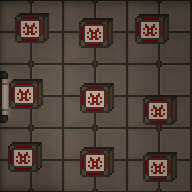
3×3, 1-core AME - With a multitool in hand, click the AME parts on the floor to build a piece of the reactor. If you mess up, you can deconstruct a built reactor with a lit welder.
- Open the antimatter control unit crate to obtain an AME Controller. Place it next to the reactor you just built and wrench it down. The HV cable underneath the controller will carry power produced from the AME. Make sure the controller is on HV wire.
- Open the antimatter containment jar crate to obtain antimatter containment jars. This is the fuel for the AME. With it in hand, click on the controller to place it in the AME. Change the Injection Amount to the desired level (see table below) and click Toggle Injection to turn the AME on.
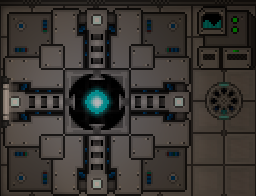
Finished AME


The wattage produced by the AME in different configurations is shown below. The color indicates the state - green: safe, yellow: Overloaded (explodes eventually), Orange: Heavily Overloaded (explodes soon), Red: Extremely Overloaded (explodes within the minute)
| Cores | |||||||||||
|---|---|---|---|---|---|---|---|---|---|---|---|
| 1 | 2 | 3 | 4 | 5 | 6 | 7 | 8 | 9 | 10 | ||
| Injection | 2 | 80.0 | 40.0 | 26.7 | 20.0 | 16.0 | 13.3 | 11.4 | 10.0 | 8.9 | 8.0 |
| 4 | 320.0 | 160.0 | 106.7 | 80.0 | 64.0 | 53.3 | 45.7 | 40.0 | 35.6 | 32.0 | |
| 6 | 720.0 | 360.0 | 240.0 | 180.0 | 144.0 | 120.0 | 102.9 | 90.0 | 80.0 | 72.0 | |
| 8 | 1,280.0 | 640.0 | 426.7 | 320.0 | 256.0 | 213.3 | 182.9 | 160.0 | 142.2 | 128.0 | |
| 10 | 2,000.0 | 1,000.0 | 666.7 | 500.0 | 400.0 | 333.3 | 285.7 | 250.0 | 222.2 | 200.0 | |
| 12 | 2,880.0 | 1,440.0 | 960.0 | 720.0 | 576.0 | 480.0 | 411.4 | 360.0 | 320.0 | 288.0 | |
| 14 | 3,920.0 | 1,960.0 | 1,306.7 | 980.0 | 784.0 | 653.3 | 560.0 | 490.0 | 435.6 | 392.0 | |
| 16 | 5,120.0 | 2,560.0 | 1,706.7 | 1,280.0 | 1,024.0 | 853.3 | 731.4 | 640.0 | 568.9 | 512.0 | |
| 18 | 6,480.0 | 3,240.0 | 2,160.0 | 1,620.0 | 1,296.0 | 1,080.0 | 925.7 | 810.0 | 720.0 | 648.0 | |
| 20 | 8,000.0 | 4,000.0 | 2,666.7 | 2,000.0 | 1,600.0 | 1,333.3 | 1,142.9 | 1,000.0 | 888.9 | 800.0 | |
| 22 | 9,680.0 | 4,840.0 | 3,226.7 | 2,420.0 | 1,936.0 | 1,613.3 | 1,382.9 | 1,210.0 | 1,075.6 | 968.0 | |
Maintenance
The AME will stop generating power when its fuel has been used up. It is wise to periodically check on the AME to make sure it is not out of fuel. If the fuel runs out, you must refuel it:
- Make sure injection is off.
- Eject the existing fuel jar from the AME.
- Place a new fuel jar into the AME.
- Turn the AME back on.
It is also wise to periodically check on the AME, since it is a prime target for sabotage.
You can see if the AME is currently overloaded (and thus taking damage), if the cores glow in a "+"-shape instead of a ball.
The display of the AME controller indicates if the AME has suffered internal damage. If it is blue, at least 50% of the internal shielding is remaining. If the display shows a red wave, it is below 50%. If the display starts showing swear words, the AME is about to explode.
Basic Permanent Power
Solar Power
Solar power is a passive means of generating power. A solar array is made up of a number of solar panels, a single solar tracker device and a solar control computer (console) nearby to properly control and manage the panels.
Most if not all solar arrays start off not connected to the station, and need to be connected via HV cables underneath each panel and connected back to the station. Once connected, use the solar control computer to change the angle and speed of tracking for the panels as shown below:


Notice the graph on the right has a T shaped white line and a yellow / golden line. The aim is to alter the panel angle (white T line) to match the sun angle (yellow line). Some experimentation might be needed to setup the angular velocity correctly so that the lines stay in sync and generate maximum wattage. Note: a general start for the angular velocity is somewhere around 5-6 degrees per minute.
A typical panel near max output will produce 1.5kW. This would be enough to power roughly 1 machine and 1 computer.
Solar panels can be ordered through Cargo by crates. One crate will contain six solar assembly flatpacks. A flatpack is unpacked using a multitool, which produces an already mounted solar assembly. 2 pieces of glass then need to be added to complete the solar panel.
A solar tracker device is made using a solar assembly flatpack as well, so don't forget to count in an extra one. It's made by unpacking a solar assembly from a flatpack, putting a solar tracker electronics inside the solar assembly and then adding 2 pieces of glass.
Thermoelectric Generator (TEG)
The TEG involves atmospherics, and atmos are usually responsible for setup unlike most other power sources. The TEG produces electric power from a temperature exchange between hot and cold gases, with a side effect of cooling the hotter gas and heating the colder one. To produce the most power, the temperature difference between the hot and cold loops should be more than about Template:Tooltip<ref>https://github.com/space-wizards/space-station-14/blob/master/Content.Server/Power/Generation/Teg/TegSystem.cs#L169</ref>. This tranfer only occurs when gases in both loops are flowing, so if pumps in the hot loop become pressure-locked then the TEG stops producing power.
There is no single correct way to set up a TEG (and the available layouts are different across all stations). Here are guides on setting up the TEG:
- SilverPraett's TEG guide
- https://forum.spacestation14.com/t/easy-and-compact-teg-setup/5599 - likely outdated
- Simple_double-loop_TEG - outdated
- Setting up the mix chamber - outdated
Radioisotope Thermoelectric Generators (RTGs)


If you're lucky enough to find an RTG, you can use it to make power. RTGs only provide 10 kW<ref>https://github.com/space-wizards/space-station-14/blob/6e91190478ec03e038ff1c3a10ecd632808f281e/Resources/Prototypes/Entities/Structures/Power/Generation/generators.yml#L239</ref> of power, but they provide it for free and for the entire round. Basically, if you connect an RTG to your power grid, it'll give you free power. Sometimes, RTGs are damaged. Damaged RTGs<ref>https://github.com/space-wizards/space-station-14/blob/6e91190478ec03e038ff1c3a10ecd632808f281e/Resources/Prototypes/Entities/Structures/Power/Generation/generators.yml#L275-L318</ref> behave just like regular ones, but they're radioactive.
Radioactive Radioisotope Thermoelectric Generator (RRTG) Setup
You can use the radioactive nature of the RTG to your advantage. Lord Singuloth generates power by emitting radiation into radiation collectors. Likewise, you can surround an RRTG in radiation collectors and generate as much as ~200-300KW with one RRTG.
Containment-based Engines
Containment-based engines trap and extract power from one of two dangerous objects: a gravitational singularity or Tesla lightning ball. While they are capable of providing enough power to keep the station running on their own, they are also extremely destructive to the station if they escape containment. Containment is similar between the two objects, though the methods of extracting power differs.
Containment Setup
To set up containment, you will need the following:
- A Singularity or Tesla Generator, which will generate a singularity or Tesla ball when struck by the Particle Accelerator.
- Four Containment Field Generators arranged as corners on a box, which will link and create a force field that keeps the object contained.
- At least four emitters, which must be powered by MV wires and fire bolts of energy that charge the Containment Field Generators.
The field generators must be placed at the corners of a rectangle (though most setups are squares) in order to link together to create the containment field. An interior size of 5x5 is safe for singularities and 1x1 for Tesla balls.
Once the Containment Field Generators, emitters, and Generator are all in place, activate the Containment Field Generators and the emitters (by left-clicking on them). The emitters will begin shooting the Field Generators, which will form a blue energy barrier after taking a few emitter bolts. Once all four sides of the containment field form, lock the emitters (by alt+clicking them) so that non-engineers can't turn them off.
Stay clear of both the emitter bolts and containment field - both damage crewmembers if touched.
Firing the emitters and the Particle Accelerator require moderate amounts of power. If the Engineering department is slow to set up main power, a portable generator may be needed to kickstart one of the containment engines.
Gravitational Singularity Setup and Maintenance
The Singularity, also known as a Black Hole or "Singulo", passively emits a large amount of radiation. They are easily identified by their gravitational lensing effect, warping light around them.
Radiation Collectors capture the emitted radiation using plasma canisters and convert it to power, transmitted to the SMEs by HV. Simply activate the Radiation Collector and it will begin providing power as long as its tank has plasma in it. The plasma will drain over time, and will need to be refilled throughout the shift.
The Singularity has a variable size - it will grow if matter falls into its core, or slowly evaporate and shrink if "starved". The Particle Accelerator is used to feed singularities in containment. A PA continually firing with a power level of 2 will keep a singularity contained in a 5x5 inner sized field stable indefinitely, and power the station by itself.
While an Engineering Hardsuit will resist some radiation, only the CE's Hardsuit, walls, and plasma glass will completely prevent radiation damage, so don't lounge around the singularity once it's active.
Tesla Setup and Maintenance
The Tesla Ball Lightning, or simply "Tesla", is an orb of pure electricity that will annihilate anything that touches its core and create targeted lightning strikes which shock nearby objects. The energy from these lightning strikes can be safely harvested and used to power the station. Additionally, the Tesla spawns mini lightning balls that will shock nearby objects before dissipating.
Lightning from the Tesla ball randomly strikes nearby objects, and are more likely to target Tesla Coils and Grounding Rods. Tesla Coils connect to HV and provide power when struck, but eventually degrade and must be repaired with a welding tool. Grounding Rods do not provide power, but are also much safer targets than other objects in the containment room (flooring, wires, emitters, lights, crewmembers). Both coils and rods have a small cooldown after being struck, during which they will not attract lightning strikes.
A safe Tesla setup requires placing Tesla Coils and Grounding Rods close to containment that attract the Tesla ball's lightning strikes (fortunately, the lightning strikes do not target powered up field generators). The coils and rods must be periodically repaired by welding, so leave enough room for a crewmember to stand nearby. It is crucial that the Field Emitters are behind the coils and rods, otherwise occasional strikes could destroy the emitters and cause a containment breach. Note that Tesla Coils and Grounding Rods block emitter bolts, so the path from the emitter to its field generator must be clear.
Tesla balls fit in a 1x1 containment area, and it is recommended to do so to minimize the risk of them striking something important and keep the mini lightning balls from spawning too far away from containment.
Unlike singularities, Tesla balls should not be fed by the Particle Accelerator after spawning. Doing so will cause the Tesla generator to spawn more mini-balls that will also cause shocks and damage the Coils and Grounding Rods.
Despite the massive amount of electricity that the Tesla ball produces, wearing a pair of Insulated Gloves prevents all harm from it shocking you. It will not prevent you from being absorbed into the core however.
Particle Accelerator Setup
The Particle Accelerator (frequently shortened to "PA") shoots a wave of particles that will activate the Singularity and Tesla generators, and will also feed the spawned objects.
Setting up the PA requires adding LV to each part of the machine, then using a screwdriver to close each panel. Once this is done, bring up the control panel and click "Scan for Parts" to ensure it is assembled correctly. You may need to unanchor the control panel, rotate it to the correct configuration, and reanchor it.
Once containment is set up and active, and the Tesla Coils and Grounding Rods are placed for Tesla, you can safely start up the PA and create the Tesla or Singularity. Enable the PA from the control panel and set its strength to 1 or 2 - it will start firing after a delay. Once the generator has been struck a few times, it will spawn the Tesla or Singularity, after which you should turn the PA off for a Tesla or to an appropriate strength for a singularity.
Stay clear of the accelerated particle wave - it will cause a decent amount of radiation damage.
Containment Failure a.k.a. "Loosing"
If a containment field fails, either due to improper setup or sabotage, the object will be free to wander the station and cause immense destruction. Such a situation is called a "Singuloose" or "Tesloose", and will almost always result in station-wide destruction and evacuation being called immediately.
However, in the event of a loose, all hope is not lost. Science can print portable particle decelerator, which can be used to damage the Singularity or Tesla.
A Singularity gains power level as it consumes more. A loose Singularity will sometimes get lost and wander off into space, minimizing damage. However, it can still find its way back before it dies out.
A loose Tesla will target any and everything with electricity. This includes the station, the Evac shuttle, Arrivals, and even you! Unlike a Singularity, it will chase down any bit of electricity it can find, until the station is rendered to pieces.
As an antagonist, intentionally sabotaging containment is sometimes considered "excess destruction" according to the Server Rules. Ensure you are exempt from such rules before considering sabotaging containment.