Research and Development

From Paradise 14 Wiki
Revision as of 21:51, 19 August 2024 by imported>Soupki (Added item module info to Exosuit Fabricator section. Added Industrial table, filled in items, crafting cost, research, tier, and research cost. Added Experimental table, filled in items, crafting cost, research, tier, and research cost. Added Civilian Services table, filled in items, crafting cost, research, tier, and research cost.)
Jump to navigation Jump to search

Template:Callout

Research and Development

Research and Development (commonly called R&D or RnD) is the job of the Scientists. The department typically lies behind purple and grey doors. In the department typically exists a set of Lathe and R&D machines. Often you will see lockers with lab equipment in them.

R&D gameplay largely revolves around the acquisition and use of research points to gain new technologies for the station.

Point Generation

Research points can be acquired through a few different sources.

The most profitable form of point generation is Xenoarcheology, which is the process of analyzing and activating different randomly generated artifacts that can be found via events, salvage debris, and by ordering them from cargo. Most artifacts have more than one "Stimulus-Reaction" combination (known scientifically as Nodes), so make sure to scan and activate as many of them as you can before selling it to cargo, or keeping it around because its effects are cool enough to warrant keeping.

Another highly valuable source of research points is Anomalous Research. Most R&D departments come equipped with an Anomaly Generator, Anomalous Particle Emitters (A.P.E.) and Anomaly Vessels, which are used to spawn, interact with, and generate points from anomalies respectively. Anomalies can come in different forms, ranging from raging balls of pink-hot matter, to electrically-discharging motes of light, to radioactive gravity wells, so make sure to wear some protective gear while studying them.

Points can also be acquired through research disks, which can be found in maintenance, salvaged from space, or found on expeditions.

R&D System

The user interface of the R&D Console

In the R&D computer new technologies can be unlocked via points. To research a technology, click on it if it's in the Unlockable technologies column. Technologies in the Future technologies are locked behind others, requiring you to research a previous technology (in the Unlockable technologies column). Technologies in the Unlocked technologies section have already been researched.

Alternative Research

There is another method to research a technology, and that is using the Technology Disk Terminal. If there is no such console available within the station, it can be created after researching the Tier 1 Experimental Technology, "Alternative Research".

By spending 1000 research points, a technology disk would be dispensed, containing the recipe of a single random item (of any tier) for the lathes to fabricate. The random item ranges from a HAMTR Harness within the "Critter Mechs" technology, a redundant item you've already researched, to the highly-sought-after (and expensive) satchel of holding.

When used early into the round, it may reward the research department with end-tier items immediately at the cost of the primary research progress. This is essentially gambling with research points, so ensure that your department agrees with this plan. When used late into the round, it may grant the research department recipes of technologies that have been locked out of the direct research method of unlocking the technology.

Equipment

There are many different recipes that can be locked behind research. The Protolathe, Circuit Imprinter, Security Techfab, Medical Tecfab, and the Exosuit Fabricator are currently the only machines that directly benefit by gaining new recipes when you achieve certain research. The following section will only cover what recipes are unlocked through research, for a full list on what each machine can craft please check out the Protolathe, Circuit Imprinter, Security Techfab, Medical Tecfab, and Exosuit Fabricator pages.

The Protolathe is a machine capable of printing most of what you've researched. It can make things such from large beakers to microreactor batteries. Protolathes are mainly found at science but can (sometimes) be found in engineering or on salvage expeditions.

Industrial

Item Crafting Cost Research Tier Research Cost
high-capacity power cell steel+glass+plastic+gold bar Advanced Powercells 1 7,500
Mining drill steel+plastic Salvage Equipment 1 7,500
Grappling gun steel+glass+gold bar
Welding gas mask steel+glass
Experimental welding tool steel+plasma Advanced Tools 2 10,000
Power drill steel+plastic
Jaws of life steel+glass+plasma+gold bar
Ore bag of holding steel+silver bar+plasma+uranium Mass Excavation 2 12,500
Diamond tipped mining drill steel+plastic+silver bar+refined diamond
Handheld mass scanner steel+glass Space Scanning 2 7,500
Holofan projector steel+glass+plastic Advanced Atmospherics 2 7,500
Bag of holding steel+silver bar+plasma+uranium Bluespace Storage 3 15,000
Satchel of holding
Duffelbag of holding
Microreactor power cell steel+glass+uranium+gold bar Portable Fission 3 10,000

Arsenal

Item Crafting Cost Research Tier Research Cost
Template:Item icon steel+plastic+plasma Explosive Technology 1 10,000
Template:Item icon steel+plastic
Template:Item icon
Template:Item icon
Template:Item icon steel+plastic+glass
Template:Item icon steel+plastic
Template:Item icon steel+glass+silver bar Salvage Weapons 1 5,000
Template:Item icon steel+gold bar Experimental Battery Ammo 3 15,000


Experimental

Item Crafting Cost Research Tier Research Cost
Template:Item icon steel+plastic Basic XenoArcheology 1 5,000
Template:Item icon steel+plastic+glass+plasma+silver bar Anomaly Core Harnessing 1 10,000
Template:Item icon steel+glass Basic Anomalous Research 1 5,000
Template:Item icon
Template:Item icon steel+plastic Local Magnetism 1 7,500
Template:Item icon steel
Template:Item icon steel+plasma+uranium Deterrence Technologies 2 7,500
Template:Item icon steel+plasma+glass
Template:Item icon steel+glass Advanced Anomaly Research 2 10,000
Template:Item icon steel+glass+uranium Quantum Leaping 3 10,000
Template:Item icon steel+glass+silver bar Gravity Manipulation 3 10,000
Template:Item icon


Civilian Services

Item Crafting Cost Research Tier Research Cost
Template:Item icon steel+plastic+glass Advanced Entertainment 1 7,500
Template:Item icon plastic+steel+glass Advanced Cleaning 2 10,000
Template:Item icon plastic
Template:Item icon steel+glass Advanced Spray 2 10,000
Template:Item icon steel+glass
Template:Item icon plastic Faux Astro-Tiles 2 5,000
Template:Item icon
Template:Item icon
Template:Item icon
Template:Item icon
Template:Item icon steel+plastic Biochemical Stasis 2 7,500
Template:Item icon steel+plastic
Template:Item icon steel+plastic+silver bar Quantum Fiber Weaving 3 10,000
Template:Item icon steel+plastic+plasma+silver bar Bluespace Chemistry 3 10,000
Template:Item icon steel+plastic+glass+plasma+silver bar


The Circuit Imprinter is a machine capable of printing machine boards used for creating machines and computers. They require steel, glass and gold.

Machine boards can be inserted into a Machine Frame whilst electronics can be inserted into computers or other machines built with Construction.

Industrial

Item Crafting Cost Research Tier Research Cost
Template:Item icon steel+glass+gold bar Ripley APLU 1 7,500
Template:Item icon
Template:Item icon steel+glass Power Generation 1 7,500
Template:Item icon
Template:Item icon
Template:Item icon steel+glass
Template:Item icon
Template:Item icon
Template:Item icon steel+glass
Template:Item icon steel+glass+gold bar Industrial Engineering 1 10,000
Template:Item icon steel+glass+gold bar
Template:Item icon
Template:Item icon steel+glass
Template:Item icon steel+glass+gold bar Mechanical Compression 1 10,000
Template:Item icon steel+glass+gold bar Salvage Equipment 1 7,500
Template:Item icon steel+glass+gold bar Atmospherics 1 7,500
Template:Item icon steel+glass
Template:Item icon steel+glass+gold bar Advanced Power Cells 1 7,500
Template:Item icon steel+glass+gold bar Shuttlecraft 2 10,000
Template:Item icon
Template:Item icon steel+glass
Template:Item icon
Template:Item icon steel+glass Space Scanning 2 7,500
Template:Item icon steel+glass+gold bar Advanced Atmospherics 2 7,500
Template:Item icon


Arsenal ( None)

Experimental

Item Crafting Cost Research Tier Research Cost
Template:Item icon steel+glass+gold bar Basic XenoArcheology 1 5,000
Template:Item icon
Template:Item icon steel+glass Basic Anomalous Research 1 5,000
Template:Item icon
Template:Item icon steel+glass Basic Robotics 1 5,000
Template:Item icon steel+glass+gold bar Alternative Research 1 5,000
Template:Item icon steel+glass+gold bar Artifact Recycling 2 5,000
Template:Item icon steel+glass+silver bar Advanced Anomaly Research 2 10,000
Template:Item icon steel+glass+gold bar


Civilian Services

Item Crafting Cost Research Tier Research Cost
Template:Item icon steel+glass Basic Hydroponics 1 5,000
Template:Item icon
Template:Item icon steel+glass+gold bar
Template:Item icon steel+glass Meat Manipulation 1 7,500
Template:Item icon steel+glass+gold bar
Template:Item icon
Template:Item icon steel+glass+gold bar Critter Mechs 1 7,500
Template:Item icon
Template:Item icon steel+glass Advanced Entertainment 1 7,500
Template:Item icon
Template:Item icon
Template:Item icon
Template:Item icon steel+glass A/V Communication 1 5,000
Template:Item icon
Template:Item icon
Template:Item icon
Template:Item icon
Template:Item icon
Template:Item icon
Template:Item icon steel+glass+bananium H.O.N.K. Mech 2 7,500
Template:Item icon
Template:Item icon
Template:Item icon steel+glass+gold bar Bluespace Cargo Transport 2 15,000
Template:Item icon steel+glass+gold bar Biochemical Stasis 2 7,500
Template:Item icon

Exosuit fabricator sprite

The Exosuit Fabricator is a machine that is capable of crafting a large variety of Cyborg and Mech parts. The Exosuit Fabricator is a material hungry machine and can use Template:Item icon, Template:Item icon, Template:Item icon, Template:Item icon, Template:Item icon, and Template:Item icon. The Exosuit Fabricator is a vital part of Cyborg creation and many of the advanced pieces are stuck behind research.

Industrial

Item Crafting Cost Research Tier Research Cost
Template:Item icon Template:Item icon+Template:Item icon Ripley APLU 1 7,500
Template:Item icon Template:Item icon+Template:Item icon
Template:Item icon
Template:Item icon
Template:Item icon
Template:Item icon Template:Item icon+Template:Item icon
Template:Item icon Template:Item icon+Template:Item icon+Template:Item icon+Template:Item icon Salvage Equipment 1 7,500
Template:Item icon Template:Item icon+Template:Item icon+Template:Item icon
Template:Item icon Template:Item icon+Template:Item icon+Template:Item icon Space Scanning 2 7,500
Template:Item icon Template:Item icon+Template:Item icon+Template:Item icon+Template:Item icon Advanced Tools 2 10,000
Template:Item iconRCD cyborg module

Arsenal (None)

Experimental

Item Crafting Cost Research Tier Research Cost
Template:Item icon Template:Item icon+Template:Item icon+Template:Item icon Basic Anomalous Research 1 5,000
Template:Item icon Template:Item icon+Template:Item icon+Template:Item icon Basic XenoArcheology 1 5,000
Template:Item icon Template:Item icon+Template:Item icon Basic Robotics 1 5,000

Civilian Services

Item Crafting Cost Research Tier Research Cost
Template:Item icon Template:Item icon+Template:Item icon+Template:Item icon Basic Hydroponics 1 5,000
Template:Item icon
Template:Item icon Template:Item icon+Template:Item icon+Template:Item icon Robotic Cleanliness 1 5,000
Template:Item icon Template:Item icon+Template:Item icon+Template:Item icon+Template:Item icon Advanced Entertainment 1 7,500
Template:Item icon Template:Item icon+Template:Item icon+Template:Item icon
Template:Item icon
Template:Item icon Template:Item icon+Template:Item icon+Template:Item icon+Template:Item icon Mechanized Treatment 2 5,000
Template:Item icon Template:Item icon+Template:Item icon+Template:Item icon+Template:Item icon
Template:Item icon Template:Item icon+Template:Item icon+Template:Item icon H.O.N.K. Mech 2 7,500
Template:Item icon
Template:Item icon
Template:Item iconX
Template:Item icon
Template:Item icon Template:Item icon+Template:Item icon

Hyper Convection Machines

Hyper convection autolathe spriteHyper convection protolathe spriteHyper convection circuit imprinter sprite

Hyper convection machine are a highly valuable upgrade that is obtained from the Industrial Engineering research node. Hyper convection machines will craft items at a 50% discount from the original cost. The trade-off when it comes to these powerful machines is that they produce an immense amount of heat. The heat that is produced from these machines can quickly become lethal if sufficient preparations are not made. One of the ways to make a safe enclosure for hyper convection machines is:

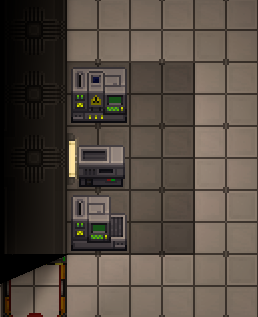
  1. Un-wrench the machines and move the Template:Item icon, Template:Item icon, and Template:Item icon to the back wall. If there is a Template:Item icon, move it out of the way.
    Hyperconvection building part 1
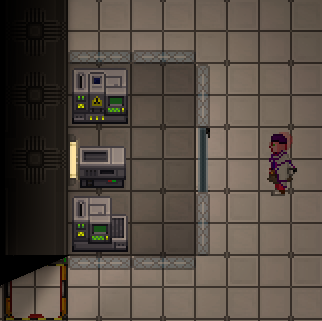
  2. Build a 2x3 box of Template:Item icon. At the middle-right side of the box create a Template:Item icon.
    Hyperconvection building part 2
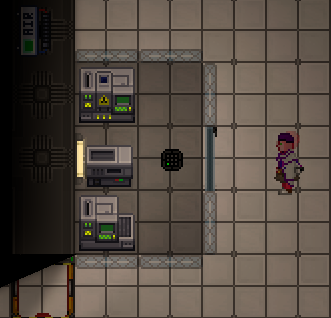
  3. Create an Template:Item icon and a Template:Item icon. Place the air sensor within the box at the center right, and the air alarm nearby for convenience.
    Hyperconvection building part 3
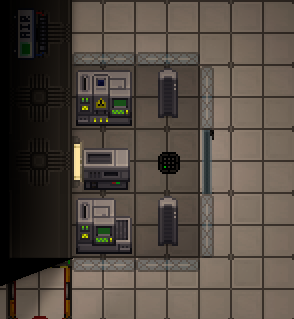
  4. Create one (required) or two (optional) Template:Item icon at the top-right and bottom-right of the box.
    Hyperconvection part 4
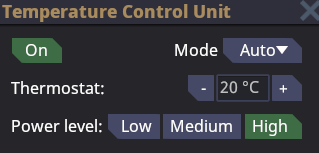
    4a. Set the space heaters to have High energy consumption and make sure that they are On.
    Hyperconvection part 4.1
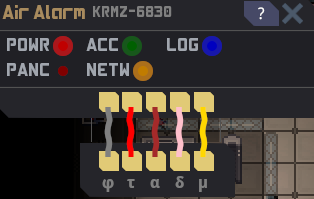
  5. Either hack the air alarm or ask an engineer to help you with networking. To hack the air alarm we must first use a Template:Item icon on it to open the panel. When the panel is open use a Template:Item icon tool on the air alarm itself. The lights above refer to the wires below. The wire that we are looking to cut is the ACC wire. The ACC wire is what controls who is authorized to network and control the Air Alarm.
    Air alarm panel
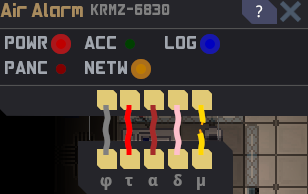
    5a. Cut the wires from left to right (by clicking on them with a wirecutter in hand) until you get the ACC light to turn off. You may get unlucky like I did and hit a power wire before the ACC wire, you will get shocked because of this. Skip the power wire and continue until you reach the ACC wire. Once you have found the ACC wire repair all other wires (by clicking on them with a wirecutter in hand) and leave the ACC wire cut. Close the panel on the air alarm with the screwdriver.
    Hyperconvection part 4.2
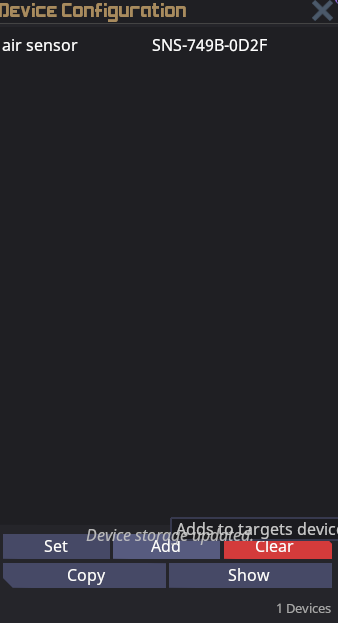
  6. Use a Template:Item icon or a Template:Item icon and click on the air sensor first, followed by the air alarm.
    air sensor clicked
    6a. Click Add on the air alarm GUI and then close the GUI.
    Air alarm networking
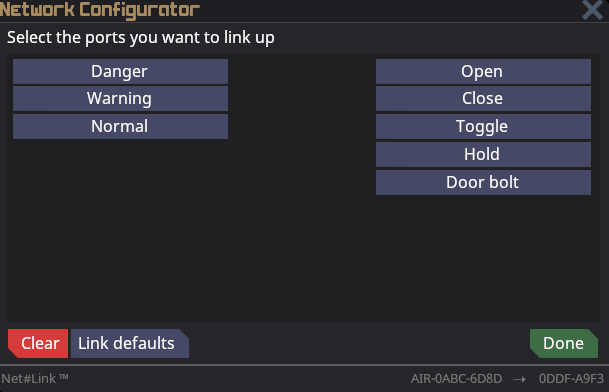
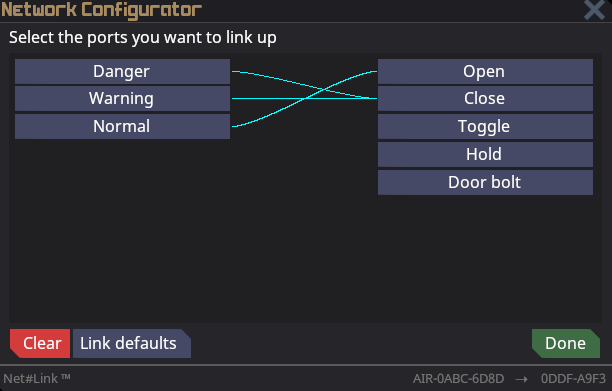
  7. In a similar process, use a multitool or a network configurator and click on the windoor first, followed by the air alarm.
    Hyperconvection networking windoor
    7a. Click the Danger button and then click Close. Click on the Warning button and click Close. Finally, click the Normal button and then click Open. Then click the Done button.
    Hyperconvection networking windoor
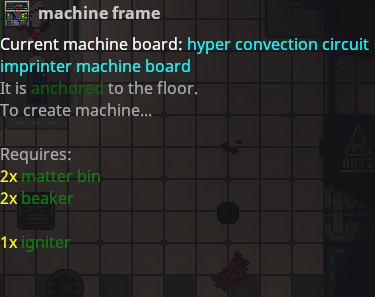
  8. Create the Template:Item icon at the Circuit Imprinter. Create or gather 1 matter bin and 1 igniter. Use a screwdriver to open the panel on the Circuit Imprinter.
    Imprinter panel open
    8a. Use a crowbar to deconstruct the imprinter into a machine frame.
    Imprinter machineframe
    8b. Use a crowbar again to remove the parts from the machine frame.
    Imprinter machineframe1
    8c. Remove the Circuit Imprinter machine board from the stack of items. Click on the machine frame while holding the hyper convection Circuit Imprinter machine board. Shift click the machine frame and fill it with the rest of the materials that it requires. (You should have all the materials if the previous steps were followed).
    8d. Screwdriver the machine frame to finish the construction. (If this does not work you are missing materials).
  9. Repeat step 8 through 8d with the Protolathe and Autolathe machines.
  10. Congratulations! You have built a hyper convection machines and a safe setup! Good work fellow scientist!

Troubleshooting

"I can't get any points/I can't print anything"

The likely cause is that the Lathe/Imprinter/Computer isn't synced up with the RD server.

To fix this in the Lathe/Imprinter/Computer click Server list, click on ID x || RDSERVER and then exit the window.